june
how to make firecracker fast(er) to start chromium in < 20ms
kernel got our start running chromium in a firecracker vm. we spent the past 14 months making it even faster. we're sharing how we get the most out of firecracker using snapshots, copy-on-write forks, uffd paging, and hot pools.

Kernel started out by running Chromium inside Firecracker microVMs, which gave us pretty fast cold starts out of the box. Still, “good enough” wasn’t good enough.
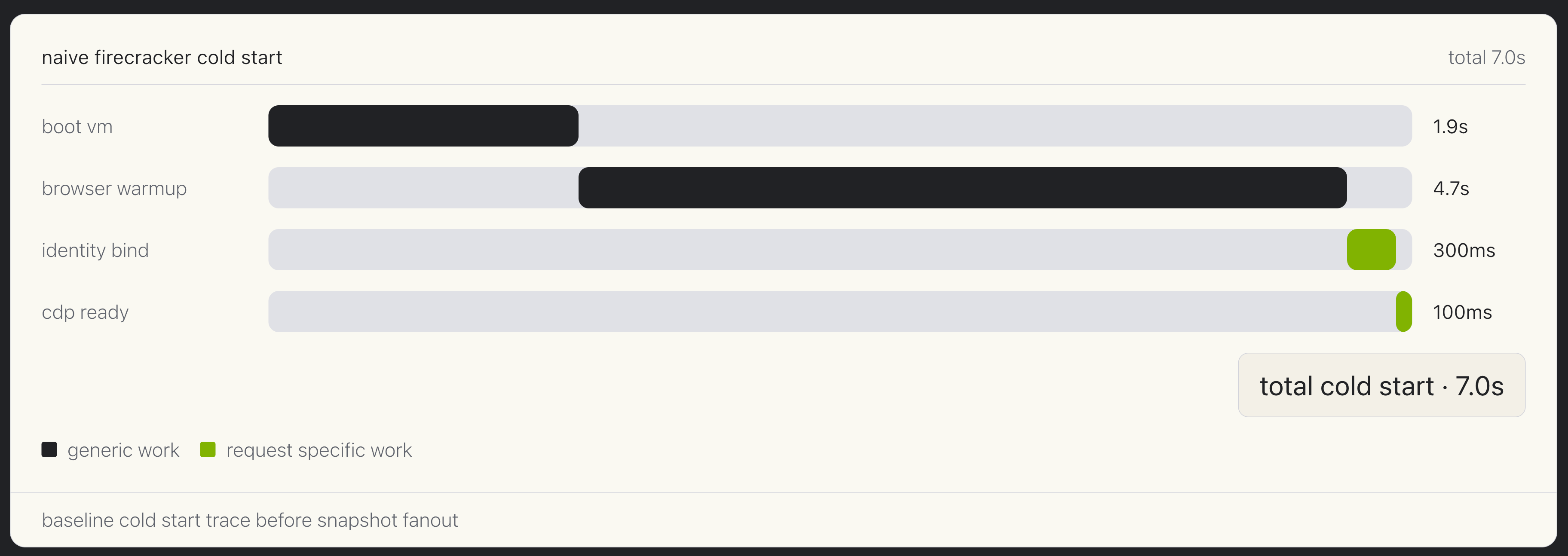
In a naive cold start, the user has to wait for the entire VM boot and browser initialization path to complete before any work can begin. Even with Firecracker, VM boot time is physically limited by disk read speed on the host. For full desktop applications, this means 1s+ cold starts with a naive Firecracker boot from disk, and Chromium or other hosted services usually takes multiple seconds to start.
We spent the next 14 months optimizing our setup to save every last millisecond. Now we’re sharing the combination of snapshots, copy-on-write forks, UFFD paging, and hot pools that we used to make firecracker even faster.
do the generic part once, then fan out
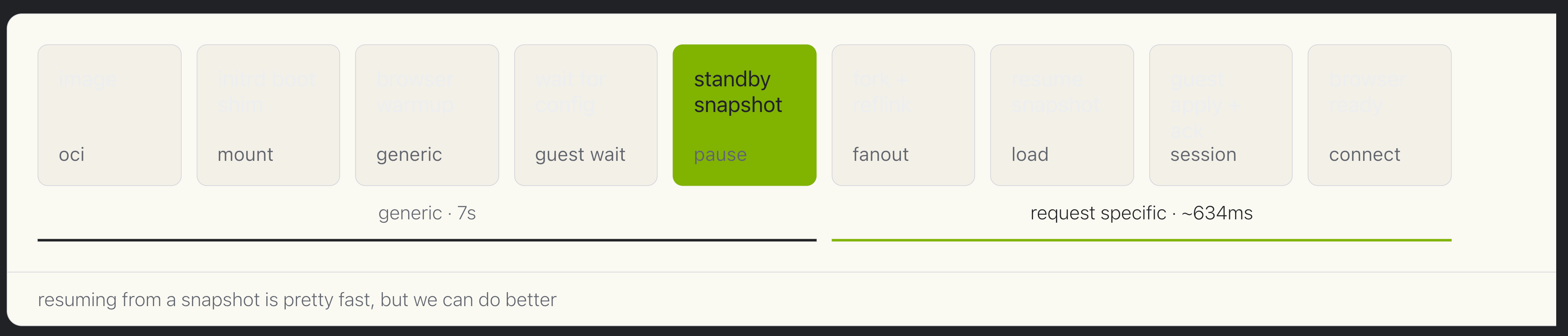
The first optimization we considered is snapshotting. The challenge is that forked VMs aren’t exactly identical; they require things like network identity and application-specific config to be different. The optimized shape is to run generic initialization ahead of time, stop at a reusable standby point, then fork many browsers from that shared snapshot.
Everything before the snapshot is generic: a container image is converted to a root filesystem, the initial ram disk mounts the rootfs, the guest application starts, the browser initializes, the guest gets ready to receive information after resuming, then waits. A snapshot is taken.
The new cold start path starts after the fork: write identity data into guest memory, resume, the guest applies the identity, then we’re ready to connect.
copy-on-write forking to keep disk work small
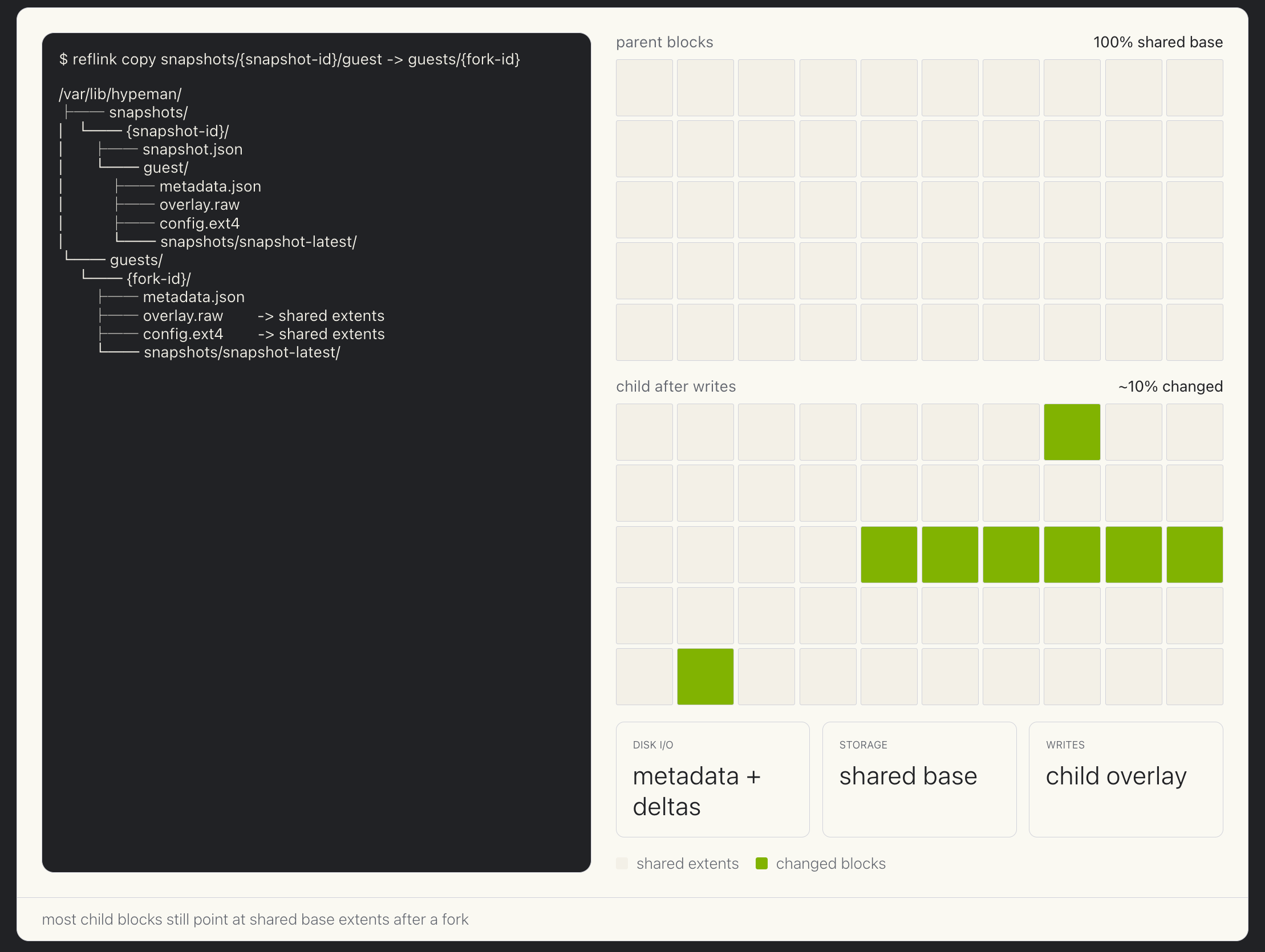
Forks share most disk blocks. A child only allocates new blocks when it writes.
Forking from the snapshot involves cloning the overlay disk and guest memory, which can be large files. Modern filesystems support Copy on Write behavior to clone files quickly and efficiently. Shared base extents are not duplicated on the host storage, and changes after forking live only in the child's files. That reduces both disk I/O and storage growth as the fanout count rises.
uffd to launch hundreds of VMs in parallel
After disk and VM state can be forked cheaply, it's loading the snapshot memory file that remains expensive.
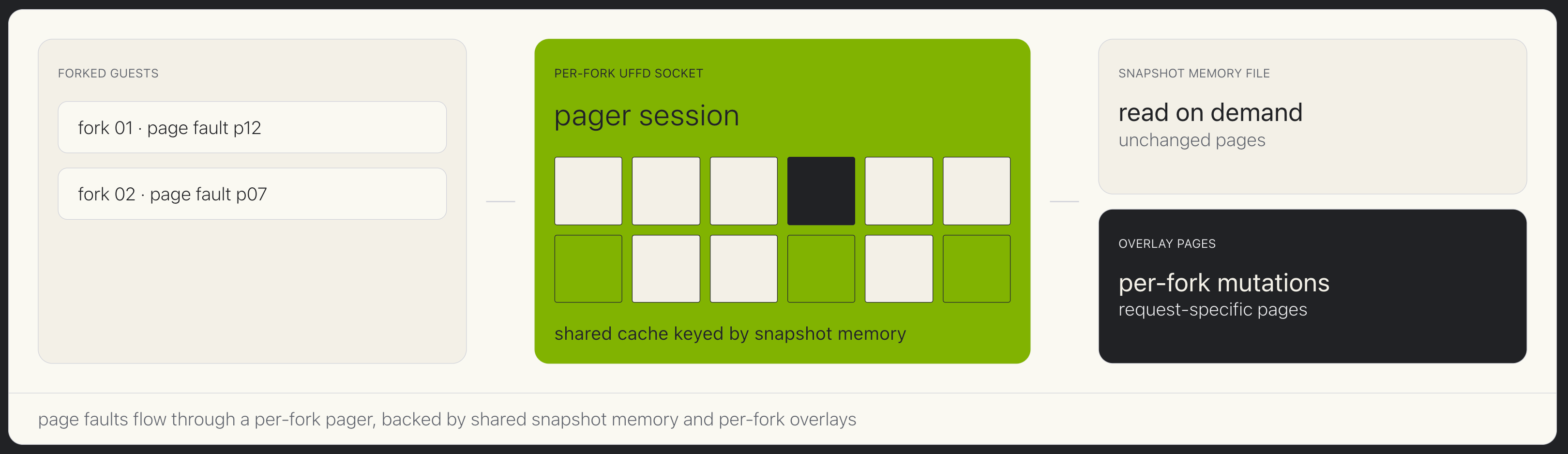
Using Firecracker snapshot support and copy-on-write forking is reasonably fast, but the system is still bottlenecked when loading data from the snapshot file into the guest VM memory. When restoring from a snapshot, Firecracker launches the VM quickly, and then the guest lazily loads memory from the on-disk snapshot into guest memory. This means each VM resume incurs a significant disk read. This scales linearly with the number of VMs being launched, which means the physical limits of host disks throttle speed during bursts.
User fault file descriptor (UFFD) support lets Firecracker restore from a memory backend that pages data in as the guest actually touches it. Multiple forks can benefit from a shared snapshot page cache, so we don’t have all the forks competing for host disk speed while page faulting memory from the snapshot into guest memory. This is the key improvement to be able to launch hundreds of VMs in parallel, with minimized host resource consumption. UFFD allows for the best possible performance on a cold start.
hot pools make the common path feel instant
Snapshot forks make cold misses fast, but the best user-facing request is still a hot pool hit.
It's important to optimize cold starts in order to address burst capacity and total density, but it's even better if you don't have to face a cold start at all. For this, we implemented hot pools.
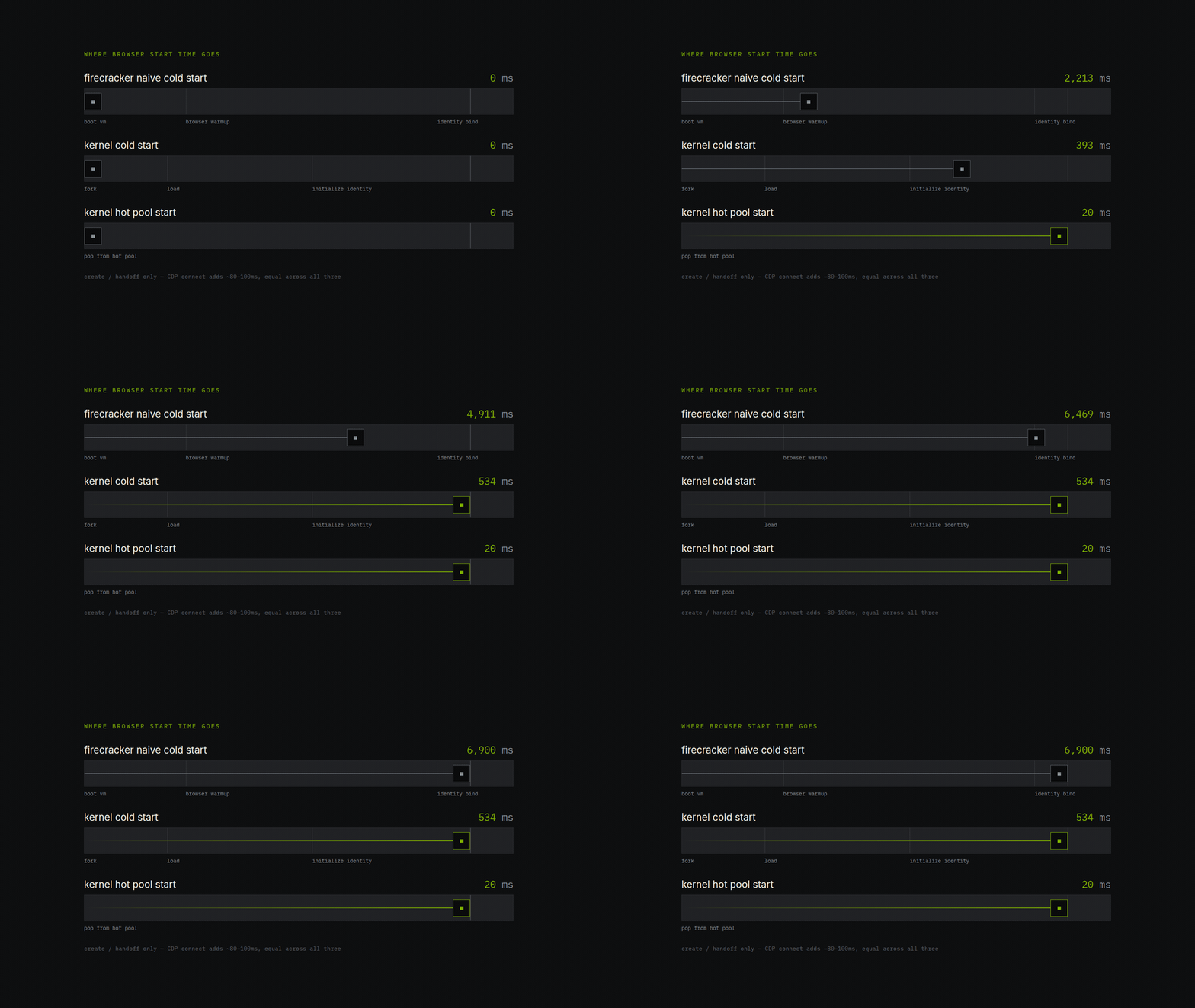
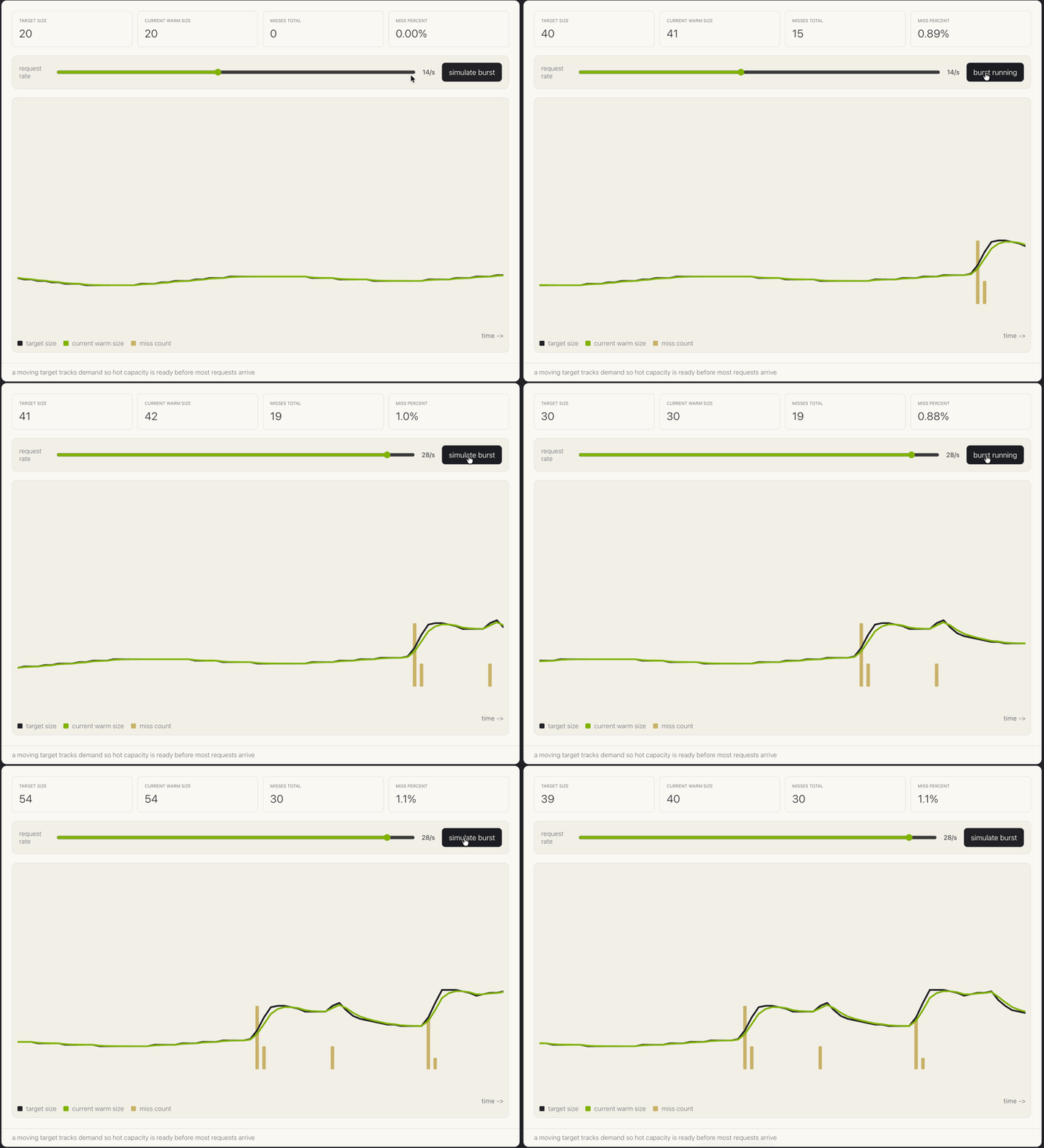
Hot pools are sets of browsers that are ready to go ahead of time. When the user requests a browser, we give them one that is already available, logically assigning it to their account. For hot hits, the handoff is 10-30ms, and the user can establish a connection to chrome in less than 80ms. A controller adjusts the target over time so normal traffic lands on hot capacity and bursts fall back to the snapshot fork path instead of a full cold start.
Even under burst loads, we only miss the hot pool ~1% of the time.
looking beyond Firecracker
with our optimizations, we're able to achieve < 20ms browser start times from the hot pool 99% of the time, and <550ms start times the other 1% of the time.
Going forward, we’re looking beyond Firecracker with Hypeman, our open-source orchestrator. We offer a different kind of performance with GPU-accelerated browsers, and we’re experimenting with next generation hypervisor technology with cloud hypervisor to support features like live VM host migration, and dynamically resizing resources via CPU or memory hot plug.
Try it out yourself on Kernel. You won’t be disappointed.