
august
introducing hypeman: our open source sandbox infra
hypeman is the open source vm hypervisor manager KERNEL built for agentic workloads, powering over 1 million browsers a month. it forks vms from snapshots in 330ms, and runs any docker image as a vm.

agentic workloads are unpredictable, bursty, and require careful isolation. a single user on KERNEL may start 2,500 browsers in a minute, with each browser running untrusted code from whichever website an agent decides to visit. the vms that power our browsers need to be ready as soon as they’re requested, then cleaned up just as quickly.
hypeman is the vm hypervisor manager we built to fit the needs of ai-driven workloads at KERNEL. it’s fully open source and already powers over 1 million browsers each month. in this blog post, we walk through why we built it and how we designed it.
a vm manager built for agents
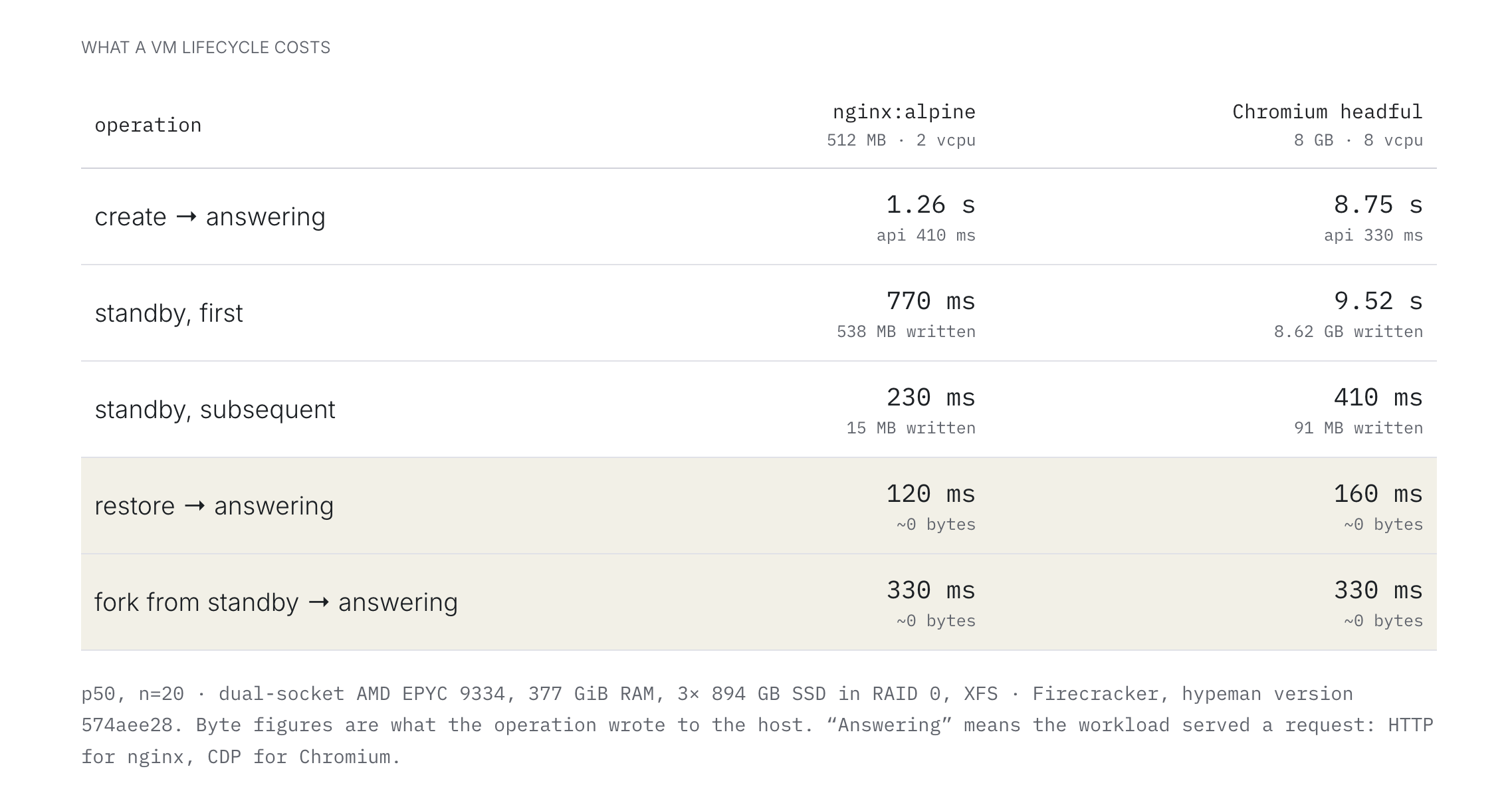
our unit of work is a browser with a lifetime that could span a few seconds to a few hours. with a median lifetime of 4 minutes, a vm that takes 10 seconds of lifecycle work like starting up, standby/resume, and deletion burns 4% of the fleet time on lifecycle alone. but importantly, that 4% can take much more than its fair share of the host resource demand if you’re doing things like pulling images, copying multi-gigabyte disks, or initializing guest applications. it’s severe enough with browsers, but for even higher-churn use cases like agentic code execution, the fraction of work dedicated to vm lifecycle is even more impactful.
hypeman is built with vm lifecycle as part of the hot path. it leverages many modern vm and filesystem features to minimize host resource demand. vms from the same image share a single read-only disk and write into their own overlay. forks hardlink the source’s memory snapshot rather than copying it, so it costs no memory i/o at fork time and siblings share a page cache. similarly shaped workloads (e.g. chromium browsers) can have better density using firecracker features while maintaining vm level isolation.
multi-hypervisor support
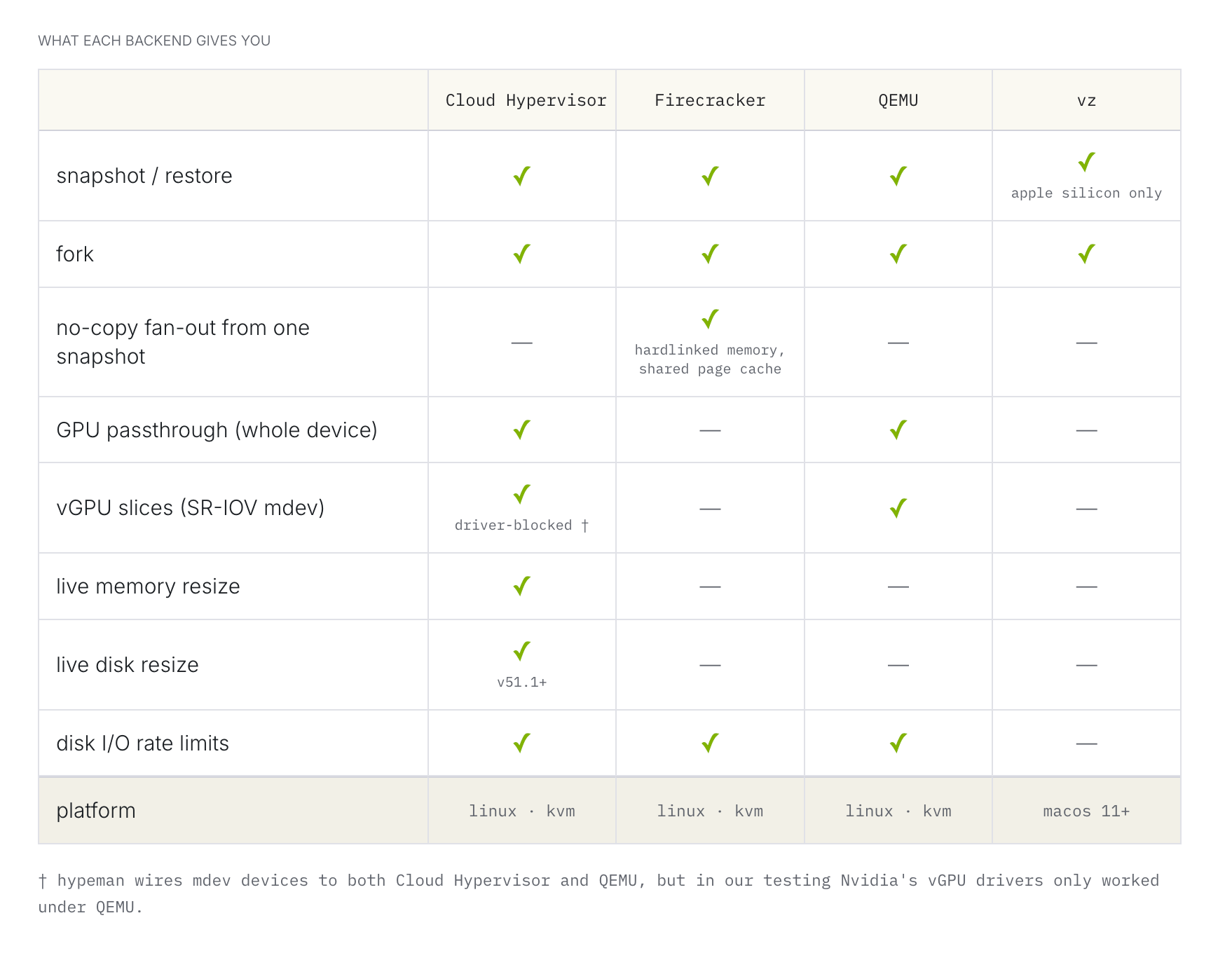
we’ve previously shared engineering learnings from making firecracker faster. but some customers want gpu browsers, and that doesn’t work on firecracker. so, we’ve spent the past 7 months adding multi-hypervisor support.
in our experimentation, we found that nvidia’s vgpu drivers only work with qemu. however, firecracker is much better for host-level resource efficiency and speed. instead of choosing, we decided to start supporting multiple hypervisor backends. we’re also monitoring cloud hypervisor in the hopes that someday it can handle hot plugging a vgpu into a browser, while still benefiting from firecracker style host efficiency (we tried).
one simple api
hypeman puts every hypervisor behind a uniform lifecycle api: create, boot, pause, snapshot, restore, fork, shutdown. this works well because we can develop our control plane logic once, then swap it over to a different type of hypervisor later, or compare resource demand between the different options. hypeman hides per-hypervisor nuances, making them all feel the same.
hypeman also has early support for apple’s virtualization framework, as a way to try running hypeman vms on a mac laptop. if you’re on apple silicon, you can try out hypeman locally.
any container image, run as a vm
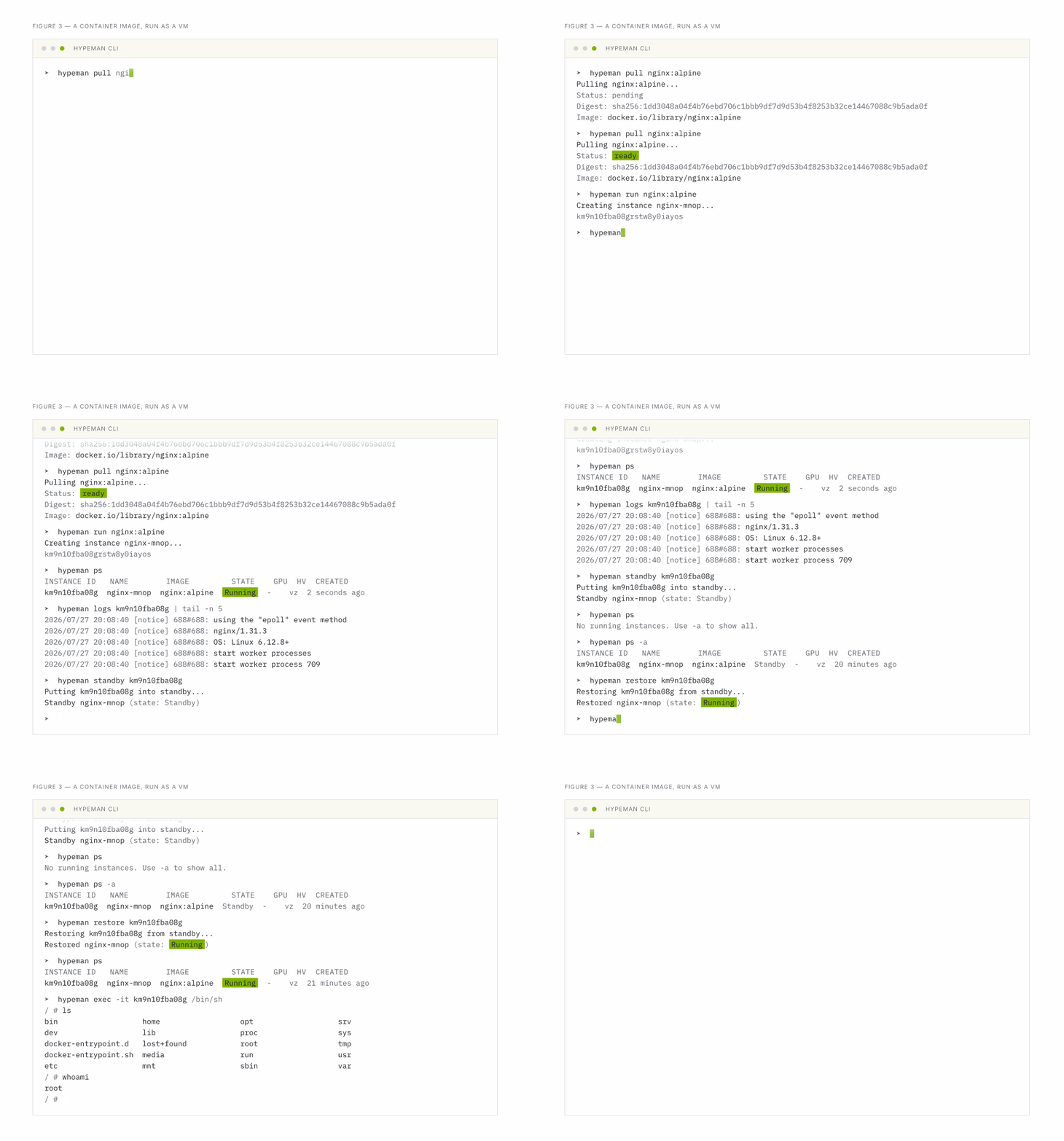
in most microvm platforms, you have to set up a special kind of build in order to package applications for running in vms. this has overhead for ci, lacks local dev parity, and it gets complicated to manage releasing new versions.
hypeman works with regular docker builds, pulling from container registries like normal.
to run arbitrary containerized workloads, hypeman boots vms with a custom initial ram disk (initrd). the initrd then mounts the readonly root filesystem from the image with a per-guest writable overlay on top, then executes the container workload. this boot process is generic for any kind of hypervisor and any kind of container image. documentation can be found in the repo.
once it’s up and running, you have the same filesystem, the same configs, and the same program running like it would in a container. it’s just in a vm instead.
resource isolation
running untrusted code in dedicated vm sandboxes is a core requirement for security isolation. when providing agent browsers at scale, KERNEL also needs to manage resource isolation so that tenants share host capacity fairly.
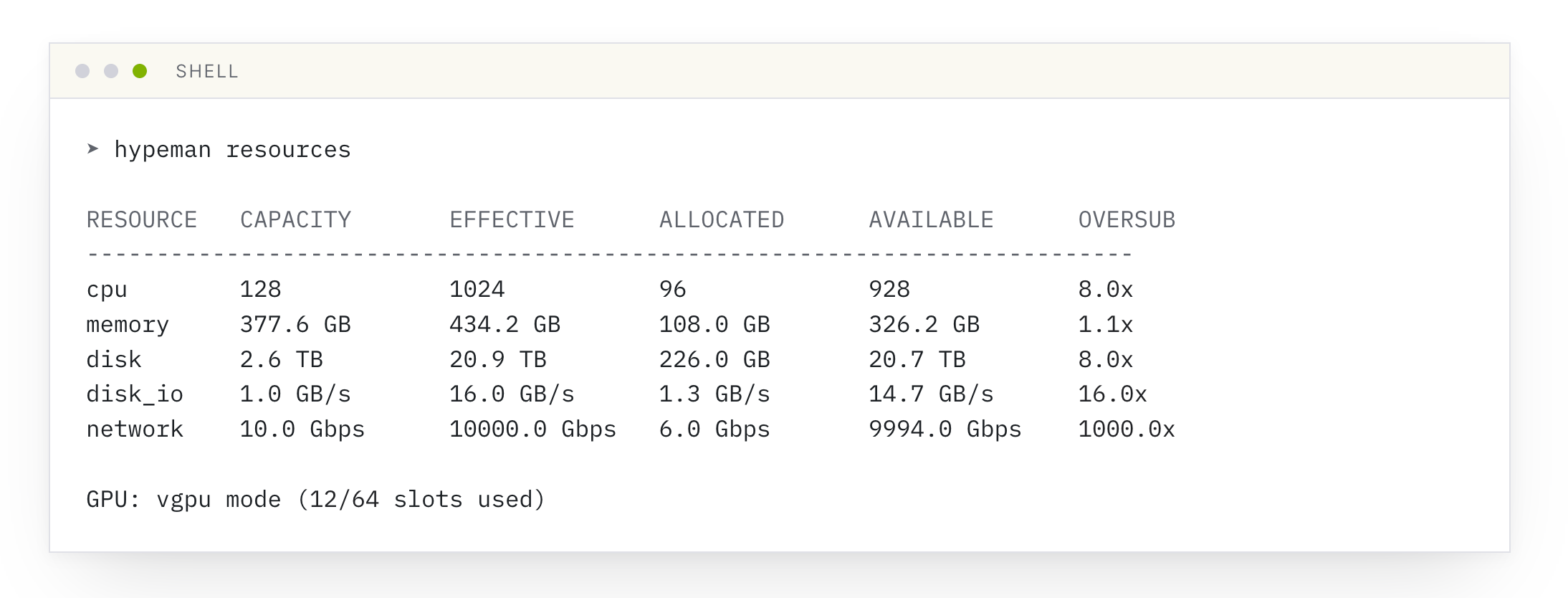
hypeman can limit vms by cpu, memory, storage, disk i/o, networking bandwidth, and vgpu profiles. disk i/o and networking bandwidth have support for burst overages, to maximize guest performance. operators can control how much workload is admitted into their hypeman servers with oversubscription ratios. these ratios configure how many resources can be allocated between all running guests compared to the total host capacity.
single host architecture
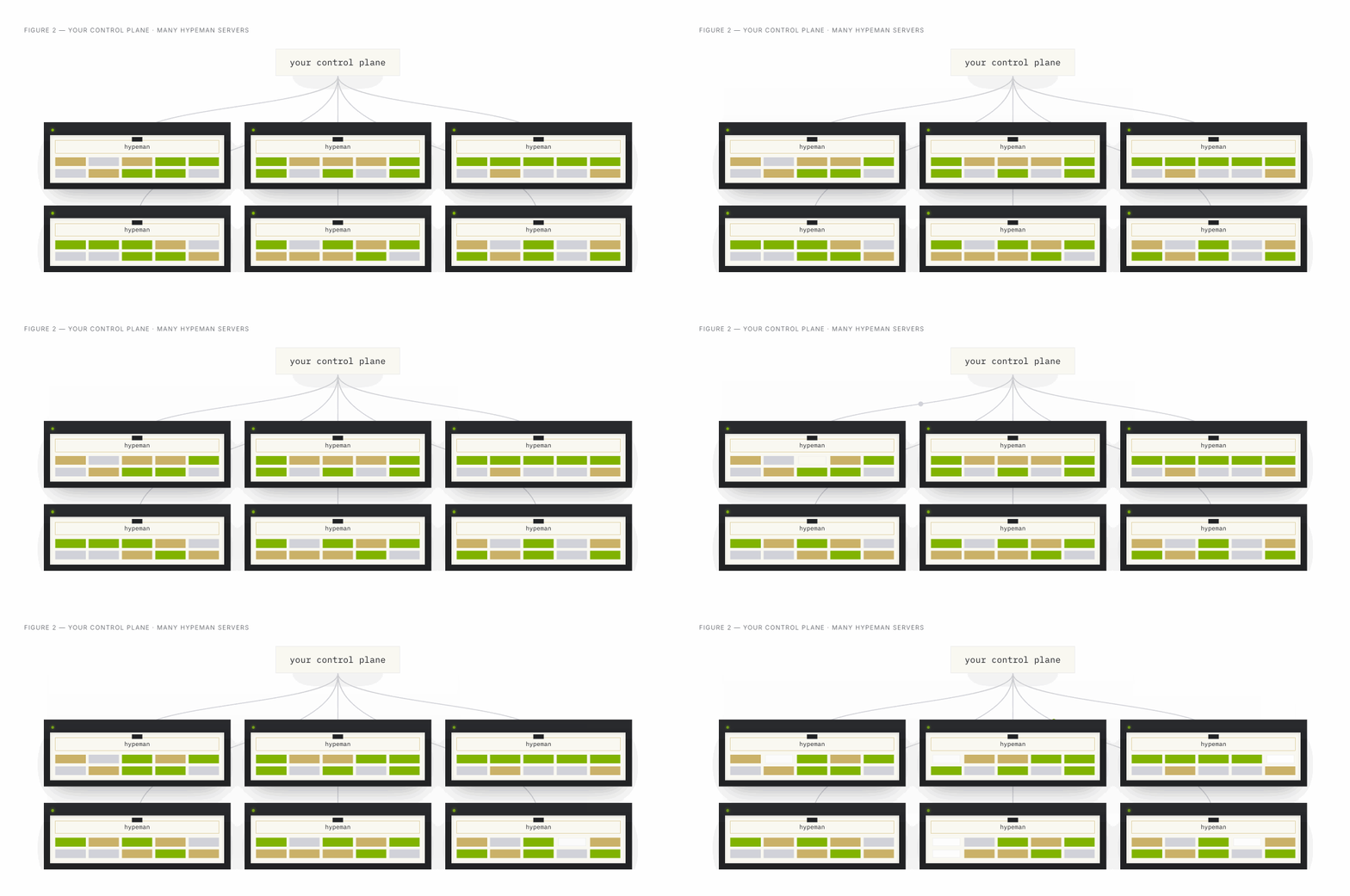
we use a control plane / data plane architecture, where our control plane is a service hosted on a standard platform-as-a-service offering, and our data plane is a fleet of bare metal servers where the vms live. what we need from hypeman is a way to host a simple sandbox api on top of a single server.
cross-host scheduling, failover, and regional placement are handled outside of hypeman. hypeman’s focus is on getting one host to efficiently manage hundreds of concurrently-running high-churn vms.
what’s in the box?
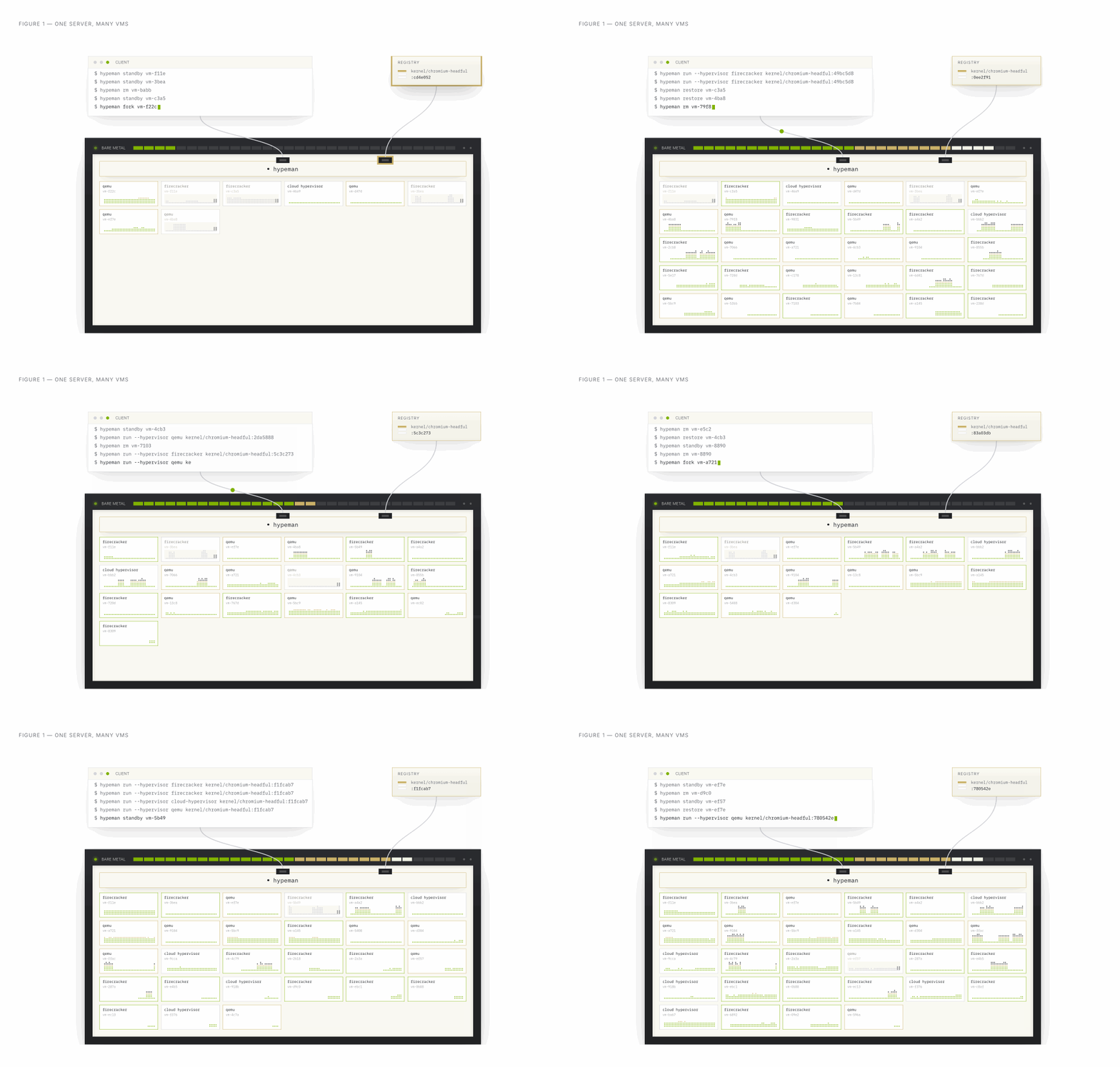
in our use case, the hosts’ hottest resource is cpu, driven by users’ work within the guest vms. at scale, we’re operating a single hypeman host with about 128 running chromium vms, at 8× cpu oversubscription. for example, if our bare metal host has 128 cpus with 8x oversubscription, that’s 1024 vcpu allocations available, which fits 128 8-vcpu vms. when idle vms are put into standby, this allows for greater density proportional to the fraction that’s in standby, because it’s only the running vms that contribute to the guest-driven cpu demand.
density limited by guest workload is what we want: this is the valuable work being performed rather than hypeman overhead. we expect other workloads to fit much more densely if the per-guest workload is lower, likely into the thousands of vms. getting into the mid-thousands per host would take more work, since at that point our internal accounting and lifecycle handling start to cost too much relative to the guest workload.
try hypeman today
from the terminal:
$ curl -fsSL https://get.hypeman.sh | bashthis installation requires kvm on linux, or macos 11+ on apple silicon.
here’s some commands to try out after first installing:
# pull and image
hypeman pull nginx:alpine

# check when it's done pulling
hypeman pull nginx:alpine

# list image
hypeman image list

# run the image
hypeman run --name test-vm nginx:alpine

# list vms
hypeman ps

# see logs
hypeman logs test-vm

# put into standby
hypeman standby test-vm

# list again, shows empty (because it's not running)
hypeman ps

# list all
hypeman ps -a

# resume vm
hypeman restore test-vm

# fork a vm
hypeman fork test-vm test-vm-2 --from-running=true

# list again
hypeman ps

# shell into the forked vm
hypeman exec -it test-vm-2 /bin/sh

# clean up
hypeman rm --force test-vm test-vm-2
aws quickstart:
we also have a way to deploy hypeman in aws. you can launch a stack with aws cloudformation or read the deploy docs.
where this is going
hypeman started as a passion project to push the boundaries of what’s possible with vm infrastructure. we decided to open source it because we believe there’s much to be done to make infrastructure agent-native, and we wanted to share it with the community.
if this work interests you, give it a try, open an issue, or propose a pr. we’d love your feedback.